Switching from Maple
A Maple alternative, for a calmer life
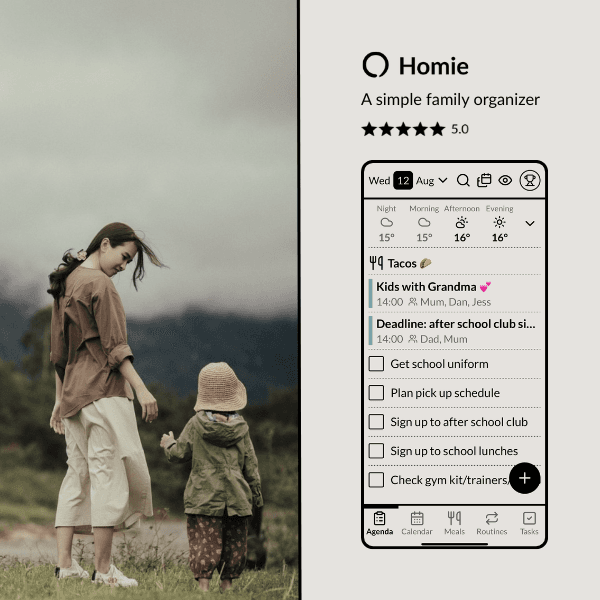
Maple closes on 31 December and deletes everything with it.
Now, Maple users are moving to Homie for the calmest way to organize their family.
Built by a family in Norway, Homie uses Scandinavian design to make the family chaos feel a lot simpler.


Psst: make sure to sign up using the offer button to receive your three months free.
Not got your data out of Maple yet? Start here first.
What Homie replaces from Maple
Everything you ran your week on, only calmer.
- The shared family calendar, color coded per person.
- One shared family account. Easy setup, easy login and simple enough for kids and grandparents.
- Works on any device, anywhere: iOS, Android, or web, easily keep everyone on the same page.
- Meal planning made easy, with an extensive recipe library and room for your own. One click adds the ingredients to your shared family shopping list.
- Your existing calendars, in seconds. Google, Apple, Outlook, we have you covered.
- Calm, clean and easy to use, with a choice of style and color coding so you can set it up the way that works best for you.
- Lists, routines, shopping and notes, organized your way, with custom categories and no limit on what you can add.
Where Homie goes further than Maple
Nobody else has to sign up.
Send the babysitter a link and she sees Tuesday. Grandparents, the football coach, the other parent’s house, all without an account or a download. Kids and other family members also don’t need an email address, they pick a profile and they’re in.
The week goes on the wall.
The wall display setting comes as standard. No add-on or upgrade needed. Turn any tablet into a wall display to make your week visible to the whole family.
It works with no signal.
Calendar, tasks and routines all run offline. Homie works when life doesn’t.
What you might not see, and why
Maple had an assistant. We have not built one, and that is deliberate. We do not think an AI should be reading your post and deciding what lands in your calendar. Somebody in the house should know why Thursday looks the way it does.
What we do is read every piece of feedback we get. So if there is anything you feel is missing and would make your life easier, let us know. We might just build it for you.
Contact usMoving from Maple to Homie
- 1.Get your data out of Maple. Before 31 December, and ideally before Christmas. Here is how.
- 2.Sign up through the Maple link. Your three months are applied for you.
- 3.Connect your calendar. Google, Apple or Outlook. About two minutes, and the biggest part of the move is done.
- 4.Add one routine, then stop for a week. The morning one, probably. Families who rebuild everything on day one tend to give up by day nine.
What comes over directly
Your external calendars. Google, Apple and Outlook, plus anything with a share link, connect in about two minutes, because those events never lived inside Maple in the first place. They keep updating on their own afterwards.
What you set up fresh
Lists, routines, meals and the family members themselves. Maple does not hand those back in a shape anything else can read, and no AI is going to rebuild them from your inbox. Add the shopping list and one routine, then leave the rest for a week.
What it costs
Three months of Premium free coming from Maple. After that, $4.99 a month or $39.99 a year for the whole family.
The shared calendar is free forever for everyone in the house. Premium adds tasks, routines, meals and notes.
If you are six months in and unhappy, we refund the lot and we will not make it awkward.
Questions
When does Maple actually close?
31 December 2026. The data is deleted, not archived.
Is Homie a replacement for Maple?
For most of what you used, yes. The shared family calendar, lists, routines, meal planning and shopping all carry over, and your Google, Apple or Outlook calendars come straight in. The one thing we have not replaced is Maple’s assistant, and that was a deliberate choice.
What should I use instead of Maple?
That depends on what you leaned on most. If it was the assistant reading your school mail, look at apps built around that. If it was the shared family calendar and keeping everyone in the house on the same page, that is what Homie is for, and Maple users get three months free to find out.
Is growmaple.com the same as Maple?
Yes. Maple, the family organizer app, lives at growmaple.com, and that is the site carrying the shutdown notice. Not to be confused with Maplesoft or MapleStory, which is why searching for a Maple alternative turns up so much noise.
Can I bring my calendar across?
Yes. If you synced Maple to Google, Apple or Outlook then those events already live outside Maple, and Homie can subscribe to or import them. Lists and recipes have to be moved by hand.
Does Homie sync changes back to my Google calendar?
No. It is one way. You can bring calendars in and see everything in one place, and edits you make in Homie stay in Homie.
Does Homie have an AI assistant?
No, by choice. We would rather a person in the house knew why the week looks the way it does. If there is something specific you relied on, tell us and it goes on the list.
What do I actually pay?
Nothing for three months if you come through the Maple link. After that Premium is $4.99 a month or $39.99 a year for the whole family. The shared calendar stays free forever either way.
Do the kids need email addresses?
No. Group code, pick a profile.
Are you going to get acquired too?
We have no outside investors, so nobody is waiting on a sale. And if we ever did wind down, you would get months of notice and a clean way to take your data out.
PS: if you do move across and something is missing, tell us. We are small enough that you will hear back from someone who can actually change it.