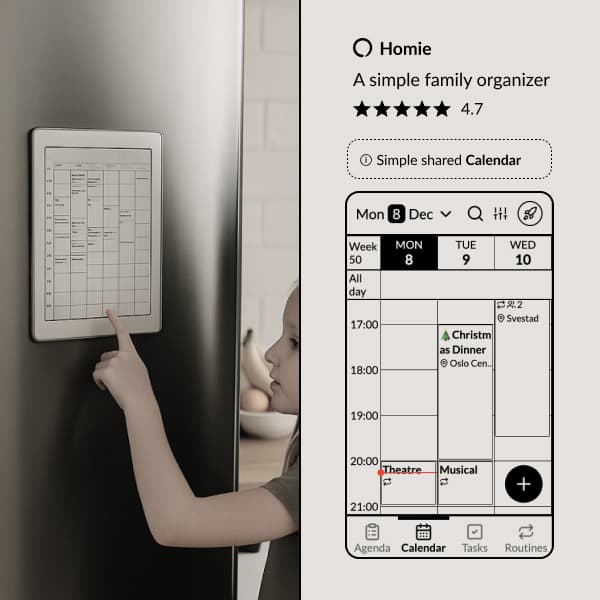
Co-parenting runs on logistics. Who has the kids on Thursday, where the gym bag is, which house heard about the dentist. Homie gives both houses the same calendar, and a way to bring in the people around it.
Homie is a calendar with lists and routines, built for parents who can cooperate. If you need a record of who changed what, it is the wrong tool. More on that below.
The coordination problem
When kids split their time between two homes, information gets lost on the way. One parent books a playdate in the other's weekend. The school event is on one calendar and not the other. The permission slip is in the house the child is not in.
Most families end up with two calendars that don't speak to each other and a chaotic group chat where information goes to get lost. The result is a missed swimming lesson and a text at 7:40 asking who is doing pickup.
One calendar both houses can see
Both parents see and edit the same calendar. Add the football match and the other house sees it within a second. It works offline too, so the plan on the bus matches the plan at home.
made easy!
Notifications so you never forget an event.
Recurring events with support for exceptions.
Task lists on events — pack for the trip, prep for the meeting.
Reactions and comments on events — coordinate with family members.
Birthdays and anniversaries.
Holidays for your country.
View in Google, Apple, or any calendar app.
Import from Google, Apple, and more - with automatic updates.
Share events or entire calendars with anyone.
Three ways to set it up
One household
Best for: two parents who cooperate and want the simplest setup. Everyone sees everything, and one subscription covers it.
- Tap Try it free, create your household and add everyone in it, kids included.
- Tap the profile icon in the top right, then Settings > Users > Share invitation, and send the link to the other parent. Or give them the Login code from Settings > Account.
- They open the link or enter the code, pick their name, and they're in.
Limits: no private space. Both parents see each other's events, lists and routines.
Two households, kids in both
Best for: blended families where the kids should see each house's whole week, and a new partner keeps their own space. People who already have a Homie household join yours for free.
- Each house creates its own household.
- One house taps the profile icon, then Settings > Users > Share invitation, and sends the link to the other house.
- The other house opens the link while logged in to their own Homie, ticks the members to add (usually the kids) and taps Join group. From then on the kids switch between the two households from the profile icon in the top right.
Limits: events and lists stay with the house they were made in. For one shared view of the kids' events, add the shared calendar below.
Two households, one shared calendar
Best for: the most private setup. Each house keeps its own household and shares one calendar. Nobody sees the other household's people, lists or routines.
- In one house, tap the profile icon, then Settings > Calendars. Open the kids' calendar, or create one, and tap Share calendar.
- Choose Other Homie account. Turn on Anyone can add/edit, and Notify me about new events if you want them.
- Tap Share in a message or Copy and send it to the other house. They open the link and tap Add to my account.
Limits: only the calendar is shared. Tasks, routines and lists stay in each house, and the kids are set up in each household separately.
A link for everyone else
The person doing the school run is often not a parent. Send the step-parent, Grandma or the coach a link to the calendar, an event or the packing list. It opens in a browser, no account needed, and they can tick things off.
to get things done together.
Organize tasks into lists that you can optionally share with other users.
Subtasks to break down big tasks into manageable steps.
Reactions and comments to communicate about tasks with family.
Notifications for important tasks.
Share links to task lists and allow anyone to collaborate, even without a Homie account.
The kids join with a code
Each household has a login code. The kids type it in and pick their name. No email address, no password.
Routines in either house
Routines are checklists the kids tick off themselves: shoes, teeth, gym bag on Tuesday. A routine belongs to the household it is set up in, so with two households each house sets its own.
that you do regularly.
Routine categories work like checklists in your day.
Important routines, like taking your medicine, will move to the next day until done.
Subtasks for routines with multiple steps like "Spring cleaning".
Skip or move a routine once.
Notifications for important routines.
A screen in both kitchens
Display mode turns a tablet you already own into a screen for the week, included in every subscription. One at each house, same calendar, and the kids check it themselves.
Can the other parent delete my events?
Yes. Everyone in a Homie household can do everything. No roles, no admin, no permission levels. That is deliberate: a calendar one parent has to approve stops being shared.
It suits parents who cooperate, and it gives no protection against someone who wants to make trouble. Deleted events, tasks and lists sit in Deleted items for 30 days, where anyone can put them back. An undo button and a change history are on our list. They are not in Homie yet.
Who this is not for
If the separation is hard and you need a record of who changed what, messages nobody can edit, or something a court will accept, Homie is the wrong tool. There is no audit log and no way to limit the other parent. Apps like OurFamilyWizard are built for that.
What it costs
The shared calendar and one shopping list are always free, for every member. Premium adds task lists, routines, meals and notes. Every new family gets 30 days of Premium free, no payment card, and if you are not happy after 6 months, email us for a full refund.
No ads. No AI. We don't sell anyone's data.
Everyone who looks after your kids can see the same week. Both parents, the new partners, the grandparents.
30 days of Premium free. No payment card.