Should AI organize your family's life? Why there's still no AI in Homie
Almost every family app is launching an AI assistant. We looked hard at the one families hear about most, timed it against typing, and still said no. Here's how we got there.

Long story short
- There is still no AI inside Homie, and we revisit that decision regularly
- We looked hardest at AI import: how often you'd use it, how far you can trust it, and what it costs
- In our timed test AI import was faster, 2 minutes against 10, but checking it took another 5 and we remembered less than half as many events the next day
- AI import usually sits behind a subscription: Cozi's is $79 a year, Sense's $59.99, Nori's $4.99 a month
- We put that time into calendar subscriptions, routines, one family login and share links instead
When we started Homie, we said there would be no AI in the app. We come back to that decision regularly, and we keep landing in the same place.
Right now almost every family app is launching an AI assistant or an AI import feature. So it seemed fair to explain why we aren't, and to walk you through how we got there.
Why we said no AI in the first place
Homie exists so that you know your family's week. You know swimming moved to Thursday because you saw it change, or because you moved it yourself.
An assistant that tells you where to be and when is a different kind of product. It can be useful, but the knowing sits with the assistant. We feel strongly that your family's schedule should stay in your hands. You organize it, Homie holds it for you. So your head has space for other things.
(For the record, we use AI to help build Homie, but there's none inside the app.)
We did think it through
We didn't want to say no out of habit. If one of these features would make your week easier, we'd want it in Homie.
So we looked hard at the one families hear about most, AI import. You take a photo of a flyer or forward a school email, and the app turns it into calendar events. We asked three things about it. How often would you use it, how much can you trust it, and what does it cost you.
How often would you use it?
For most families, a few times a year. The big job is the school calendar, which arrives once a year with the term dates, the days off and the early pick-ups. After that it's the odd flyer for a class trip or a tournament.
We ran through how many times a year this would be for our family and we could only come up with three moments: the new school year, the theater practice schedule and the tennis schedule.
We looked for evidence that families use it more than that and found very little. Cozi keeps its AI import in its top plan, Max, at $79 a year. Its Gold plan, without AI, is $39. One outside analysis from July 2026 (36Kr, using AppMagic data, in Chinese) reported that far more people choose Gold, and that Cozi's reviews rarely mention the AI features. It's an estimate, and it matched our hunch.
How much can you trust it?
Enough to save some typing, as long as you check every event. The apps say so themselves. Sense's terms tell people that AI results can be wrong or incomplete and to review AI-generated events before relying on them. Famora shows you a review screen before anything is saved, which we think is the right way to build it.
So the job becomes reading each event against the original. We wanted to know how that compares with typing them in, and we timed it with three real school newsletters.
| Typed into Homie | AI import in Cozi Max | |
|---|---|---|
| Time to add the events (min) | 10 | 2 |
| Time checking and correcting (min) | 0 | 5 |
| Events recalled the next day | 5 of 9 | 2 of 9 |
The clock ran from opening the newsletter until every event was saved, checked and fixed. A day later we each listed the events from memory. It's a small test, and one you can repeat at home. Let us know if you get different results.
AI import was quicker, and we expect it always will be. But it made errors often enough that the check has to happen every time if you want a calendar you can rely on.
The result that interested us more was recall. Typing the events in left us remembering more than twice as many the next day. So we can't compete on time. If you want reliable information and to know what's happening in your week, typing it in did better.
What does it cost you?
Usually a subscription, after a small free allowance. AI is expensive to run, so that's a fair way to charge for it. Here's what three of the better-known apps listed on October 7, 2026.
| App | Free AI allowance | Price for more |
|---|---|---|
| Nori | 10 free AI uses | Nori AI Plus: $4.99/mo billed annually, or $7.99 monthly, unlimited |
| Sense | 10 AI actions per month | Premium: $6.99/mo or $59.99/yr, unlimited |
| Cozi | None. AI import is in Max only | Max: $79/yr |
Prices are from each company's own pricing page.
If you're weighing one of these up, ask what counts as one use. A newsletter with eight events could count as one or as eight, and we couldn't find that spelled out on Sense's pages.
Where we landed
For most families, AI import would get used a few times a year, need checking every time, and add to the price. A lot of the AI features we looked at seemed to us like the shiny thing that gets you to download the app. We don't think you'd miss them by March.
That's our view, and there are families it doesn't fit. We get to them at the end.
What we built instead
We put that time into features that take work off your plate and give you an exact result. We've tried to keep each one as calm and easy to use as we can.
Calendar subscriptions. If the school or the soccer club publishes a calendar link, you add it once. Their events show up in Homie and update within about 20 minutes when they change them. Subscribing is free. There's nothing to check, because it's the school's own data. You can also bring in an old calendar when you move to Homie.
Routines. The things that happen every week get set up once and repeat. The kids tick off their own.
One login for the family. Everyone sees the same calendar and lists, and everyone can add and change things.
Share links. A grandparent or another parent on the team can open an event or add to a list from a link, without installing anything.
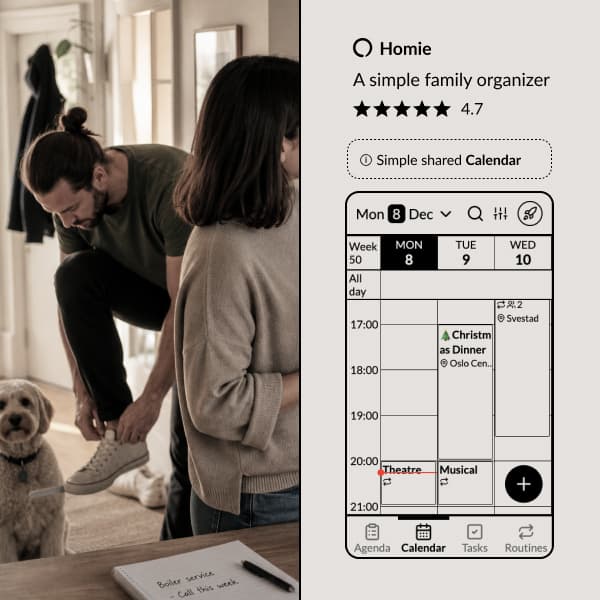
Here's how we've solved it in the Homie app:
Simple enough for the kids and grandparents. Powerful enough for the structure geeks. We kept what we loved from other calendars and to-do lists, and improved the rest.
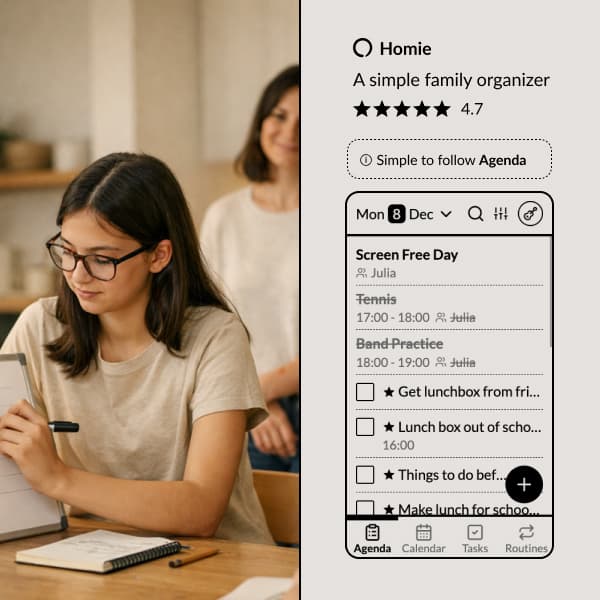
Your agenda
of events, tasks, meals, and routines for the day.
That leaves the newsletter that only exists as a PDF. You type that one in. It took us 10 minutes for three of them, and afterwards we knew what was coming.
Homie is $4.99 a month or $39.99 a year for the whole family. Calendars and one shared shopping list are free. There are no ads and we don't sell anyone's data.
Who should pick an AI organizer instead?
Families who get several school emails a day and can't keep up with reading them. If that's your inbox, an app that reads it for you may well be worth paying for. Sense and Nori are both built around that, and Famora shows you a review screen before it saves anything.
There are plenty of good apps to choose from, and we'd rather you found the one that fits your family. If you'd like to try ours, calendars are free forever, so start with your shared family calendar and see what features you actually need.
Explore Homie
Making busy family life
CALMER
Homie is a simple, yet powerful operating system for your family, so you can stop chasing schedules as the family's notification system.
Ready to organize your family?
Try Homie free and see how simple family organization can be.